
Verse Mapping in One Click – My Christian Journal
One verse, opened all the way — meet Study
You've read John 11 a hundred times.
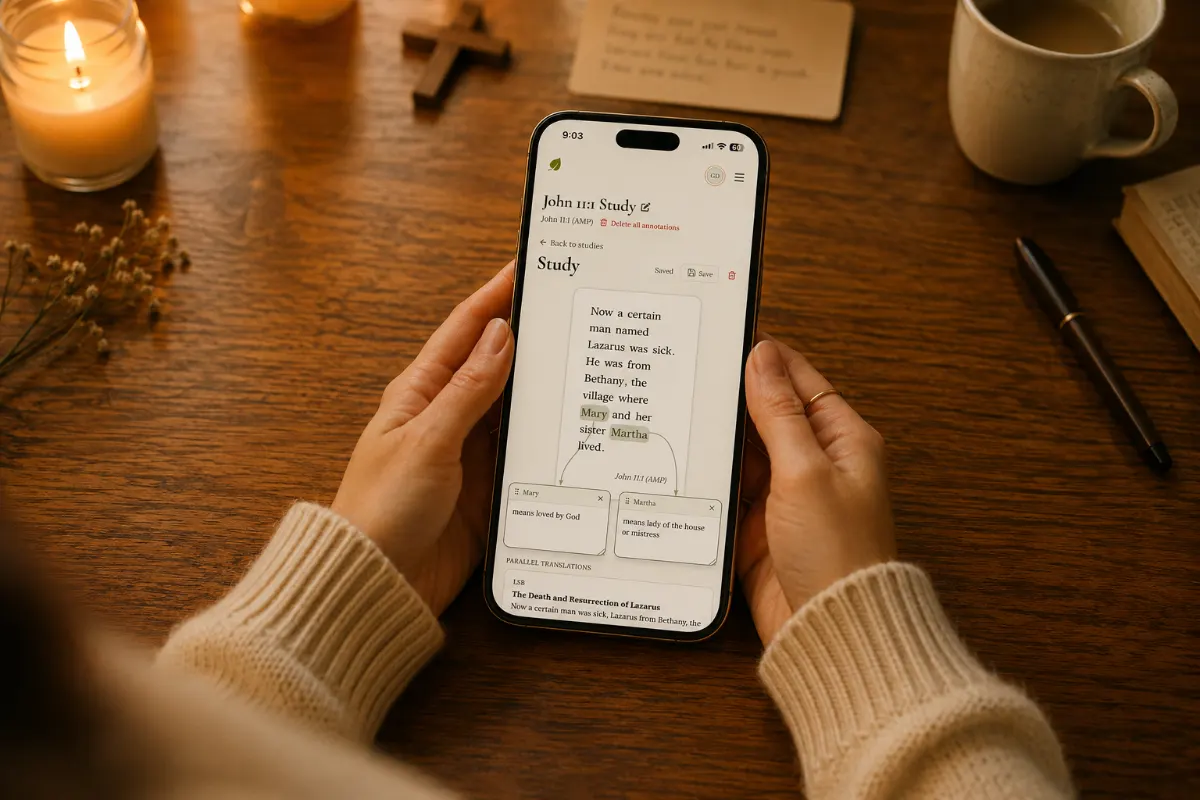
"Now a certain man named Lazarus was sick. He was from Bethany, the village where Mary and her sister Martha lived."
You've underlined it. You've sat through sermons on it. You know what's coming — the tomb, the four days, the stone, the voice that calls a dead man out by name.
But one Tuesday morning at the kitchen table, with the coffee getting cold, you stop on the names.
Mary means loved by God.
Martha means lady of the house.
And suddenly the whole story tilts. The woman in the kitchen and the woman at His feet aren't just two personalities — they're two identities. One defined by what she manages. The other by what she's loved by. The tension you've felt your whole walk with the Lord has names on it.
The Study tool will help you capture that.
What Study is
Study is the part of My Christian Journal you open when reading isn't enough — when the Spirit puts His finger on a single verse and you need to sit with it.
You pick a translation, a book, a chapter, a verse. The verse appears in the center of a quiet canvas — large, clean, breathable. No commentary fighting for your attention. No chapter scrolling past. Just the words.
Then you click.
Click "Mary." A small card appears with the word on it, connected by a curving line back to the verse. Write what you just found out— a name meaning, a cross-reference, the memory the Spirit just surfaced.
Click "Martha." Another card. Another thread. Another note.
When you're done, the verse looks the way it sounded in your spirit: the words you stopped on, with the meaning tied right to them, by a line you can see.
Three translations, side by side
Below the canvas you'll find your parallel translations — the same verse in three more versions, lined up so you can read across them.
You pick your favorites once, in Preferences. After that they show up automatically every time you open a study. So when one translation says certain man, another says a man, and a third says Lazarus from Bethany, you see the texture in seconds — without juggling tabs or stacking five Bibles on your lap.
A different translation is sometimes the whole sermon. Study makes that comparison effortless.
A notes panel that breathes
To the right of the parallel translations is your notes panel — a full rich-text editor with headings, lists, quotes, bold, italic, underline.
This is where the longer reflection lives. The paragraph you'd write in the margin if your Bible had room. The numbered list of what you're hearing about Mary's identity that you'd lose if you tried to fit it in a Notes app.
Everything saves as you go. Walk away. Come back tomorrow. Pick up exactly where the Spirit dropped you.
Any entry in your journal — a dream, a prophecy, a prayer, a Sunday note — can be linked to a study. The dream from February tied to the verse you couldn't shake in May. That overlap, where the Word meets what He was already saying through other rooms, is sometimes where He's speaking the loudest.
Title it like the study it is
At the top of every study is a title you can rename in place — John 11:1 Study – Martha & Mary Personalities, or The names of the sisters, or whatever the Lord is showing you it's actually about. Click the pencil, type, hit enter.
If you started on the wrong verse and haven't annotated yet, you can switch the verse without losing the title or the notes. The moment you've started attaching words, though, we make you clear the annotations on purpose — your study is sacred, and we don't undo it by accident.
What Study is for
It's for the verse you can't shake. For the notes while listening to a sermon.
It's for the morning you sit down with one line and need a place where the meaning can come out and stay — connected to the word that gave it, beside the translation that opened it, under the notes that hold what He said.
You don't always need to study a whole chapter. Sometimes you need to go all the way in on a single verse.
The text was always there. Study just hands you the tools to listen to it.